0%
,
0 ÷ 0 × 100 = 0%
Calculate percentage, classes needed, or classes you can skip, free, no signup.
The attendance calculator uses the standard formula:
(Classes Attended ÷ Total Classes Held) × 100
Example: If you attended 45 classes out of 50, your attendance percentage is 45 ÷ 50 × 100 = 90%.
Most colleges and universities require a minimum of 75% attendance to sit for exams. Use the "Classes Needed" mode to calculate exactly how many more classes you need to attend to reach this threshold. The tool accounts for the fact that each future class you attend also increases the total number of classes held, so the math is more sophisticated than a simple subtraction.
Example: If you've attended 30 out of 50 classes and need 75%, you need 30 more classes (not 8), because each additional class you attend also counts toward the total.
If you already meet the minimum attendance requirement, you might want to know how many future classes you can safely skip. Use the "Can Skip" mode to find the maximum number of additional classes you can miss while still staying above the minimum required percentage.
This tool is designed for students in colleges, universities, and schools. Whether you need to track college attendance, class attendance, or school attendance, our calculator provides instant results. It also supports specific university minimums like 75%, 80%, or 85%.
This attendance percentage calculator uses one formula:
Attendance % = (Classes attended ÷ Total classes held) × 100
The attendance percentage formula catches people out in one specific way: the denominator is classes held, not classes scheduled for the whole term. If 40 classes have taken place so far and you attended 32, your attendance is 32 ÷ 40 × 100 = 80%, even though 60 classes may be scheduled by the end of the semester. Your percentage will keep moving as more classes are held.
That is also why this attendance calculator online asks for classes held so far separately from classes remaining: the two numbers answer different questions.
A 75 attendance calculator is the single most-needed version of this tool, because 75% is the standard minimum at most Indian colleges and universities. The 75 percent attendance calculator mode above answers the exact question students ask: 75 percent attendance calculator how many days do I still need to attend?
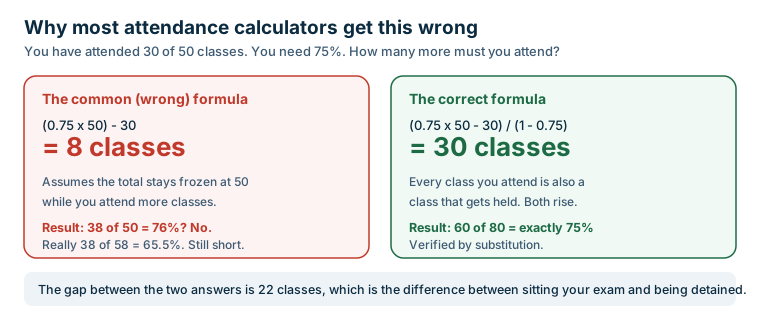
The maths is less obvious than it looks. Many tools get this wrong by calculating (0.75 × total) − attended, which assumes the total stays frozen while you attend more classes. It does not, every future class you attend is also a class that gets held, so both numbers rise together. The correct formula is:
Classes needed = (target × total − attended) ÷ (1 − target), where target is written as a decimal.
Worked example: you have attended 30 of 50 classes, which is 60%, and you need 75%. The wrong formula gives 8 classes. The correct answer is (0.75 × 50 − 30) ÷ 0.25 = 30 classes. Attend 30 more and you reach 60 of 80, which is exactly 75%. Getting this wrong by 22 classes is the difference between sitting your exam and being detained.
One important limit: 100% is not recoverable. Once you have missed even a single class, no number of future classes will return you to 100%: the formula divides by zero at that target. The tool shows a specific message for this case rather than a misleading number.
The third mode is a bunk calculator: instead of asking how many classes you must attend, it tells you how many you can afford to miss while staying above your minimum. Enter your classes attended, classes held and the minimum percentage you must maintain, and it returns the number of classes you can still skip safely.
Use this honestly. The figure assumes you attend every remaining class after the ones you skip. If you fall ill later in the term, that buffer is already spent, so most students keep a margin of two or three classes rather than using the number down to zero.
The calculation is identical whichever institution you are in, but the thresholds are not.
Whatever your institution, always verify the exact threshold and the counting method in your own academic regulations. The preset buttons above cover the common values of 65%, 75%, 80% and 85%.
Not every course uses the familiar 75% rule, and the exceptions tend to be strict rather than lenient.
Medical programmes regulated at national level generally require attendance to be met separately in theory and in practical work, often at 75% or 80% in each. Being comfortably above the bar overall does not help if your practical attendance falls short, because the two are assessed independently.
Law programmes commonly work to a 70% minimum per subject, again counted individually rather than as an aggregate across papers.
Because the counting rules differ this much, calculate each subject separately using the tool above instead of relying on a single overall figure, and confirm the exact threshold in your own course regulations. The preset buttons cover 65%, 75%, 80% and 85%, and you can type any other value.
A monthly attendance percentage calculator answers a narrower question, how you did in one month, while an overall attendance percentage calculator covers the whole term to date. Both use the same formula; only the range of classes you count changes.
Monthly figures are worth tracking because they are actionable. Discovering in April that your semester attendance is 68% leaves you very little room; noticing in February that one month came in at 55% gives you time to correct it. Institutions almost always assess eligibility on the overall figure, not the monthly one, so treat monthly numbers as an early warning rather than the official result.
Searching for an attendance percentage calculator excel sheet usually means you want
to track attendance over time. Excel is genuinely good for that: a column of dates, a column of
present or absent, and =COUNTIF(B:B,"P")/COUNTA(B:B)*100 gives you a running percentage.
What a spreadsheet will not do without extra work is the reverse calculation, how many classes you still need to hit 75%. That requires the (target × total − attended) ÷ (1 − target) formula, and it is the part most people get wrong when building it themselves. The tool above does it for you, so many students use Excel to log attendance and this page to interpret it.
Plenty of people look for an attendance calculator app to install. This page does the same job in a browser with nothing to download, no permissions to grant and no account to create. It works on any phone, and because the calculation runs locally your attendance figures are not sent anywhere. The trade-off is that a web page will not store your history between visits the way a dedicated app can, pair it with a simple note or spreadsheet if you want a running record.
An employee attendance percentage calculator works the same way for workplace use: replace classes with working days and enter days present against total working days.
To calculate attendance percentage, divide the number of classes attended by the total number of classes held, then multiply by 100. For example, if you attended 45 classes out of 50 total, your attendance percentage is (45 ÷ 50) × 100 = 90%.
The formula for attendance percentage is: (Classes Attended ÷ Total Classes Held) × 100.
Use our "Classes Needed" mode. Enter your current attended classes, total classes held, and your target percentage (default 75%). The tool calculates exactly how many more classes you need to attend, accounting for the fact that each future class you attend also increases the total. If your target is 75% from 30/50, you need 30 more classes, not 8.
If your current attendance is very low, even attending all remaining classes might not be enough. Our "Classes Needed" mode tells you if your target is mathematically impossible given your current attendance.
Use our "Can Skip" mode. Enter your attended classes, total classes held, and the minimum required percentage. The tool calculates the maximum number of additional classes you can skip without dropping below the minimum.
Attendance percentage = (classes attended ÷ total classes held) × 100. The denominator is classes actually held so far, not the number scheduled for the whole term, so your percentage changes as more classes take place.
Use the formula (0.75 × total held − attended) ÷ 0.25. If you have attended 30 of 50 classes you need 30 more consecutive classes to reach 75%, not 8. The common shortcut of (0.75 × total) − attended is wrong because it ignores that every future class you attend is also a class that gets held.
Use the bunk calculator mode: enter your classes attended, classes held and your minimum required percentage, and it returns how many classes you can still miss. Keep a margin of two or three classes in reserve for illness in place of using the full number.
No. Once any class has been missed, 100% attendance cannot be recovered by attending future classes: the formula has no finite solution at that target. 100% can only be maintained from the start, never restored.
It depends on your institution. Many universities require the minimum in each subject separately, which means you can be above 75% overall and still fall short in one paper. Check your own academic regulations and calculate each subject individually if that is the rule.
Use =COUNTIF(B:B,"P")/COUNTA(B:B)*100 where column B records P for present and A for absent. Excel handles the running total well, but it will not tell you how many classes you still need to reach 75% unless you build that formula yourself.