Marks Percentage Calculator
Instant percentage for 10th, 12th, exams & school, free, no signup.
Custom grading scale
Set your own grade names and minimum percentage cut-offs. Highest cut-off first.
Add each subject, we'll total everything automatically.
| Subject | Obtained | Total |
|---|
Subject breakdown
Find out what you need in your remaining papers to hit a target percentage.
Compare two attempts, e.g. mid-term vs final, or two exam sittings.
Attempt A
Attempt B
Recent calculations
| Result | When |
|---|
How to calculate marks percentage
This is a free marks percentage calculator online, so there is nothing to install and nothing to sign up for. Use it as an online marks percentage calculator on a phone or a desktop.
The marks percentage calculator uses the standard formula:
(Obtained Marks ÷ Total Marks) × 100
Example: If you scored 72 out of 500, your percentage is 72 ÷ 500 × 100 = 14.4%. Use this tool for 10th marks percentage, 12th marks percentage, or any exam or school assessment.
Marks percentage calculator for 10th & 12th
Students preparing for board exams often need a 10th class marks percentage calculator to work out their 10th class marks percentage or 12th marks percentage. CBSE and many state boards use a total of 500 marks (5 subjects), while some streams include practicals and have a total of 600. Use the preset buttons above to quickly set the total marks for your board.
Subject-wise total marks calculator
For students with multiple subjects, the subject-wise mode lets you enter each subject’s obtained and total marks. It automatically sums up the grand total and calculates your overall exam marks percentage or school marks percentage.
Marks percentage to grade
Based on the standard Indian grading scale (varies by board):
| Percentage | Grade |
|---|---|
| 91 – 100 | A1 |
| 81 – 90 | A2 |
| 71 – 80 | B1 |
| 61 – 70 | B2 |
| 51 – 60 | C1 |
| 41 – 50 | C2 |
| 33 – 40 | D |
| Below 33 | E (Fail) |
Grading pattern may vary by board or year. Always check your board’s official scale for exact cutoffs.
Percentage calculator of marks, one tool for every board and class
This percentage calculator of marks works the same way whatever exam you are converting, because the underlying maths never changes: marks obtained divided by total marks, multiplied by 100. What changes is the total. The sections below show the totals that come up most often in Indian boards and universities, so you can match your marksheet quickly.
10th marks percentage calculator (SSC and SSLC)
A 10th marks percentage calculator is the most searched version of this tool, and for good reason. Class 10 percentage decides stream allotment in Class 11. Most state boards mark Class 10 out of 500 (five subjects × 100) or 600 (six subjects × 100).
If you are using a 600 marks percentage calculator pattern, enter 600 as the total. For example, 492 out of 600 is 492 ÷ 600 × 100 = 82%. On a 500-mark pattern, 410 out of 500 is 82% as well: the same percentage from different totals, which is exactly why you should never compare raw marks across boards.
The SSC marks percentage calculator pattern (Maharashtra, Telangana, Andhra Pradesh) and the SSLC marks percentage calculator pattern (Karnataka, Kerala, Tamil Nadu) both fit here. Use the subject-wise mode if your subjects have unequal maximum marks, for instance a practical subject out of 50 alongside theory papers out of 100. Some boards also exclude a sixth additional subject from the percentage; check your marksheet and only enter the subjects that count.
12th, inter and HSC percentage calculator
A 12th marks percentage calculator matters more than Class 10 because college cut-offs are built on it. Class 12 is usually out of 500 across five subjects, though science streams often split each subject into theory and practical.
The inter marks percentage calculator pattern used in Telangana and Andhra Pradesh is different again: intermediate is marked across two years, commonly totalling 1000 marks. Enter 1000 as the total for the combined result, or 500 for a single year.
Many colleges compute a "best of four" or "best of five" percentage rather than using all subjects. In that case use subject-wise mode and enter only the subjects your target college counts: the tool will total them correctly.
Degree, university and IGNOU percentage calculator
For a degree marks percentage calculator, the total depends on how many papers your semester or year contained. A semester with six papers of 100 each is out of 600; a full-year aggregate might be out of 1200 or more. Enter the actual total printed on your marksheet instead of assuming a standard figure.
The IGNOU marks percentage calculator case is worth calling out separately. IGNOU results combine an assignment component (usually weighted 30%) with a term-end examination (usually 70%). If you want your overall percentage, enter your weighted total against the weighted maximum: not the term-end paper alone, which will give an inflated figure.
An ITI marks percentage calculator follows the same logic, with trade theory, trade practical, workshop calculation and employability skills each carrying their own maximum. Use subject-wise mode and enter each paper with its own total.
School, exam and subject marks percentage calculator
For a single test, the exam marks percentage calculator use is the simplest one: if you scored 38 out of 50, that is 38 ÷ 50 × 100 = 76%. The school marks percentage calculator case usually means a term or unit test out of 20, 25, 50 or 80.
A subject marks percentage calculator gives you the percentage for one subject on its own, which is useful when you need to know whether an individual paper cleared a required cut-off. A 10 marks percentage calculator handles the smallest case, 7 out of 10 is 70%.
Use the total marks percentage calculator mode when you want the aggregate across every subject at once. The subject-wise table adds up all your obtained marks and all your maximum marks, then applies the same formula to the grand total.
Marks percentage calculator formula
The marks percentage calculator formula is:
Percentage = (Marks obtained ÷ Total marks) × 100
The percentage calculator formula is identical for any total, which is why one tool covers Class 10, Class 12, degree and single-test cases. Two points where people commonly slip up:
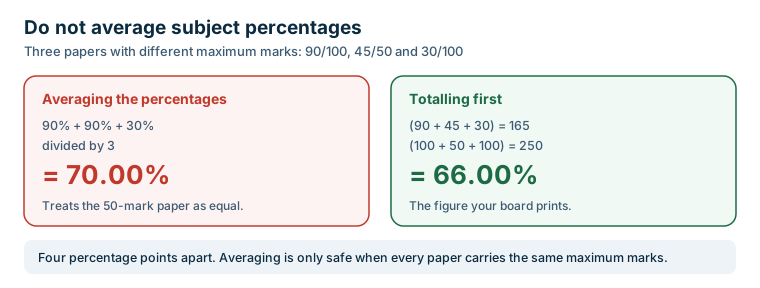
- Do not average percentages of subjects that have different maximum marks. Add the obtained marks and the total marks first, then convert once. Averaging subject percentages gives a different, and incorrect, answer whenever the maximums differ.
- Grace marks and moderation are already included in the marks printed on your marksheet. Do not add them again.
How to calculate percentage in calculator
If you are wondering how to calculate percentage in calculator on a normal handheld device, the sequence is: type the marks obtained, press ÷, type the total marks, press =, then press × 100 and = again. On a calculator with a % key you can press the % key instead of × 100.
How to find percentage in calculator on a phone is the same sequence: the phone calculator app behaves identically. The advantage of using the tool at the top of this page is that it shows the working alongside the answer, so you can check that you entered the right total.
Calculator se percentage kaise nikale
Agar aap soch rahe hain ki calculator me percentage kaise nikale, to tarika bahut simple hai. Apne obtained marks ko total marks se divide kijiye, phir 100 se multiply kijiye. Jaise 425 ÷ 500 = 0.85, aur 0.85 × 100 = 85%. Yahi percentage kaise nikale calculator se ka standard formula hai, chahe aap 10th, 12th ya degree ka result nikaal rahe hon.
Percentage to grade, what your score means
- 90% and above, A1 / Outstanding
- 80–89%, A2 / Distinction
- 70–79%, B1 / First Division
- 60–69%, B2 / First Division
- 50–59%, C / Second Division
- 40–49%. D / Third Division, usually the minimum pass
- Below 33–40%. Fail in most Indian boards; the exact pass mark varies by board
Grade bands differ between boards and universities, so treat this as a general guide and confirm the bands printed on your own marksheet.
How to find percentage of marks in calculator
If you are working on a handheld or phone calculator rather than this page, the key sequence is the same everywhere. This is the answer to how to find percentage of marks in calculator and to how to calculate percentage of marks in calculator:
- Type the marks you obtained.
- Press the divide key.
- Type the total marks.
- Press equals, then multiply by 100 and press equals again.
On a calculator that has a % key you can press % in place of the final step. That covers how to check percentage of marks in calculator, how to take percentage of marks in calculator and how to get percentage of marks in calculator, since all of them describe the same four key presses.
People also search for how to convert marks into percentage in calculator and how to calculate marks percentage in calculator. Same method. The only thing that changes between boards is the total you divide by. If you would rather not key it in at all, how to check marks percentage in calculator is answered fastest by the tool at the top of this page, which also shows the working so you can confirm how to find marks percentage in calculator matched what you expected.
Exam marks calculator for board and competitive exams
This page doubles as an exam marks calculator: enter what you scored and the maximum, and it returns the percentage. As a board exam marks calculator the total is usually 500 or 600, and as an online exam marks calculator for a single unit test it might be 20, 25 or 50.
One important limit. For a competitive exam marks calculator the raw percentage is rarely what matters, because those exams use negative marking and normalisation instead. If you are working out a JEE or NEET score, use the JEE and NEET score calculator, which applies the correct +4 / −1 marking rather than a plain percentage. Treat exam marks calculator percentage as a guide to how much of the paper you got right, not as a rank or a cut-off prediction.
ICSE, HSC and state board percentage calculator
The formula does not change between boards, but the totals do, which is why the same tool works as an ICSE percentage calculator, an HSC percentage calculator or a 10th percentage calculator state board.
- ICSE: as an ICSE percentage calculator class 10 the aggregate is normally computed on best-of-five subjects, with English compulsory. A class 10 ICSE percentage calculator should therefore total only the five subjects your school counts, not every subject on the marksheet.
- HSC: a 12th HSC percentage calculator for Maharashtra and similar boards works on a 600 or 650 total when practicals are included. Enter the total printed on your statement of marks.
- State boards: a 10th percentage calculator state board case is usually 500 across five subjects, though several states run 600 with a sixth subject that may or may not count toward the aggregate.
When a board excludes an additional subject from the aggregate, enter only the counted subjects in subject-wise mode. Including an extra paper is the most common reason a self-calculated percentage does not match the one printed on a marksheet.
CBSE grade calculator: turning percentage into a grade
A CBSE grade calculator maps your percentage onto the letter grade band your board publishes. The table above does exactly that, so it serves as a CBSE grade calculator 10th and a CBSE grade calculator 12th at the same time.
Two cautions worth knowing. First, CBSE has used both absolute grading and relative positional grading in different years, so the band that applies to you depends on your exam year. Second, grade boundaries differ between boards: an 89% is an A2 under one scale and an A under another. Always confirm the bands printed on your own marksheet before quoting a grade on an application.
Frequently asked questions
How to calculate percentage in a calculator?
To calculate percentage on a calculator, divide the obtained marks by the total marks and multiply by 100. For example, 72 ÷ 500 × 100 = 14.4%. Our tool does this instantly for you.
What is the formula for marks percentage?
The formula for marks percentage is: (Obtained Marks ÷ Total Marks) × 100. This gives you the percentage score out of 100.
Calculator se percentage kaise nikale?
Calculator se percentage nikalne ke liye, obtained marks ko total marks se divide karein aur 100 se multiply karein. Jaise: 72 ÷ 500 × 100 = 14.4%. Hamara tool yeh sab apne aap kar deta hai.
How is 10th and 12th marks percentage calculated?
10th and 12th marks percentage is calculated the same way: total obtained marks across all subjects divided by total maximum marks, multiplied by 100. CBSE uses 500 total marks (5 subjects), while some boards use 600 (with practicals).
What percentage is required for a distinction?
In most Indian boards, 75% and above is considered a distinction. Some institutions consider 60% as distinction. Always check your specific board's official guidelines.
Can obtained marks be more than total marks?
Yes, in some cases students get bonus marks, grace marks, or extra credit which can make obtained marks exceed the total. Our tool shows a soft warning but still calculates the percentage.
What is the marks percentage formula?
The formula is percentage = (marks obtained ÷ total marks) × 100. For example, 425 out of 500 is 425 ÷ 500 × 100 = 85%. The same formula applies to Class 10, Class 12, degree and single-test marks: only the total changes.
How to calculate percentage in calculator?
Enter the marks obtained, press the divide key, enter the total marks, press equals, then multiply by 100. On a calculator with a % key you can press % instead of multiplying by 100. The tool on this page does the same calculation and also shows the working.
How do I calculate 10th or 12th marks percentage out of 500 or 600?
Add up the marks you obtained in all counted subjects, then divide by the total maximum and multiply by 100. On a 600-mark pattern, 492 obtained gives 492 ÷ 600 × 100 = 82%. On a 500-mark pattern, 410 obtained gives 82% as well.
Can I average the percentages of each subject instead?
Only if every subject has the same maximum marks. If maximums differ, for example a practical out of 50 alongside theory papers out of 100, averaging subject percentages gives a wrong answer. Add all obtained marks and all total marks first, then convert once.
How does the IGNOU marks percentage calculation work?
IGNOU combines an assignment component, usually weighted 30%, with a term-end examination weighted 70%. Enter your weighted total against the weighted maximum to get the correct overall percentage. Using the term-end paper alone will overstate your result.
Calculator se percentage kaise nikale?
Obtained marks ko total marks se divide kijiye aur phir 100 se multiply kijiye. Jaise 425 ÷ 500 = 0.85, aur 0.85 × 100 = 85%. Yahi formula 10th, 12th aur degree, sabhi ke liye kaam karta hai.
How to find percentage of marks in calculator?
Enter the marks obtained, press divide, enter the total marks, press equals, then multiply by 100 and press equals again. On a calculator with a % key you can press % instead of the final step. The tool on this page does the same four steps and shows the working.
Can I use this as an exam marks calculator?
Yes. Enter what you scored and the maximum for that paper. It works for board exams, school unit tests and any assessment marked out of a fixed total. For competitive exams with negative marking such as JEE or NEET, use the JEE and NEET score calculator instead, since a plain percentage does not apply there.
Does this work as an ICSE or HSC percentage calculator?
Yes. The formula is identical across boards, only the total changes. For ICSE class 10 the aggregate is usually computed on best-of-five subjects with English compulsory, so enter only the subjects your school counts. For HSC class 12 the total is often 600 or 650 once practicals are included.
How does a CBSE grade calculator work?
It maps your percentage onto the grade band your board publishes, which is what the percentage-to-grade table on this page does for both class 10 and class 12. Note that CBSE has used both absolute and relative positional grading in different years, so check the bands printed on your own marksheet.
Is there an online marks percentage calculator I can use on mobile?
This page is an online this tool that runs in any phone browser with nothing to install. Every calculation happens inside your own browser, so your marks are never uploaded anywhere.
Notes on accuracy
- Grade bands and pass marks differ between boards. The bands listed here are a general guide, so confirm the ones printed on your own marksheet.
- IGNOU results combine an assignment component with the term-end examination, usually weighted 30/70. Check the weighting on your grade card at ignou.ac.in.
- For CBSE marking patterns and result formats, see cbse.gov.in.
- Some boards exclude an additional sixth subject from the aggregate. Enter only the subjects your board actually counts.